The web console
Use a web browser to administer AryaOS. Normal setup and operation do not require SSH. The console controls TAK destinations, sensor roles, radios, updates, VPN, and support bundles.
No SSH required
The console supports daily administration from a phone or laptop. SSH remains available for advanced recovery. You do not need it for the tasks that follow.
How to reach it
Every AryaOS device runs Cockpit, a web-based system management console, on HTTPS. It is exposed two ways:
| Address | Serves | Notes |
|---|---|---|
https://aryaos-xxxx.local:9090/ |
Cockpit directly | Cockpit's own port |
https://aryaos-xxxx.local/admin/ |
Cockpit via lighttpd | lighttpd on :443 proxies /admin > Cockpit |
https://aryaos-xxxx.local/ |
Landing portal | Read-only live status page |
Replace xxxx with your device's four-character suffix. The same hex characters appear in the hostname aryaos-xxxx and the onboarding Wi-Fi SSID AryaOS-xxxx. Before first-boot personalization, the factory hostname is aryaos (https://aryaos.local/).
When no known Wi-Fi is in range, the device broadcasts its AryaOS-xxxx hotspot. Join it, then browse to https://aryaos-xxxx.local/admin/. See Wi-Fi & onboarding hotspot.
Once the device has joined your network, reach it at the same aryaos-xxxx.local name (mDNS/Bonjour) or by its IP address from the landing portal.
If the unit is joined to your Tailscale tailnet, use its tailnet name or IP. See VPN (Tailscale).
Self-signed certificate
Each AryaOS unit generates its own per-device web TLS certificate at first boot. Thus, your browser will warn that the connection is not trusted the first time you connect. This is expected. Confirm the exception to continue. The certificate protects the session between your browser and this device.
Logging in
Log in as the pi user with the device password.
The default password expires at first login
Release images ship with a well-known default pi password that is expired at first login. You will be forced to set a new one. Choose a strong password and record it. There is no password-recovery feature. See Security posture.
The landing portal
Browsing to https://aryaos-xxxx.local/ shows the landing portal. This lightweight status page runs independently of Cockpit and Node-RED. It is the fastest way to confirm a unit is healthy before you dig into administration.
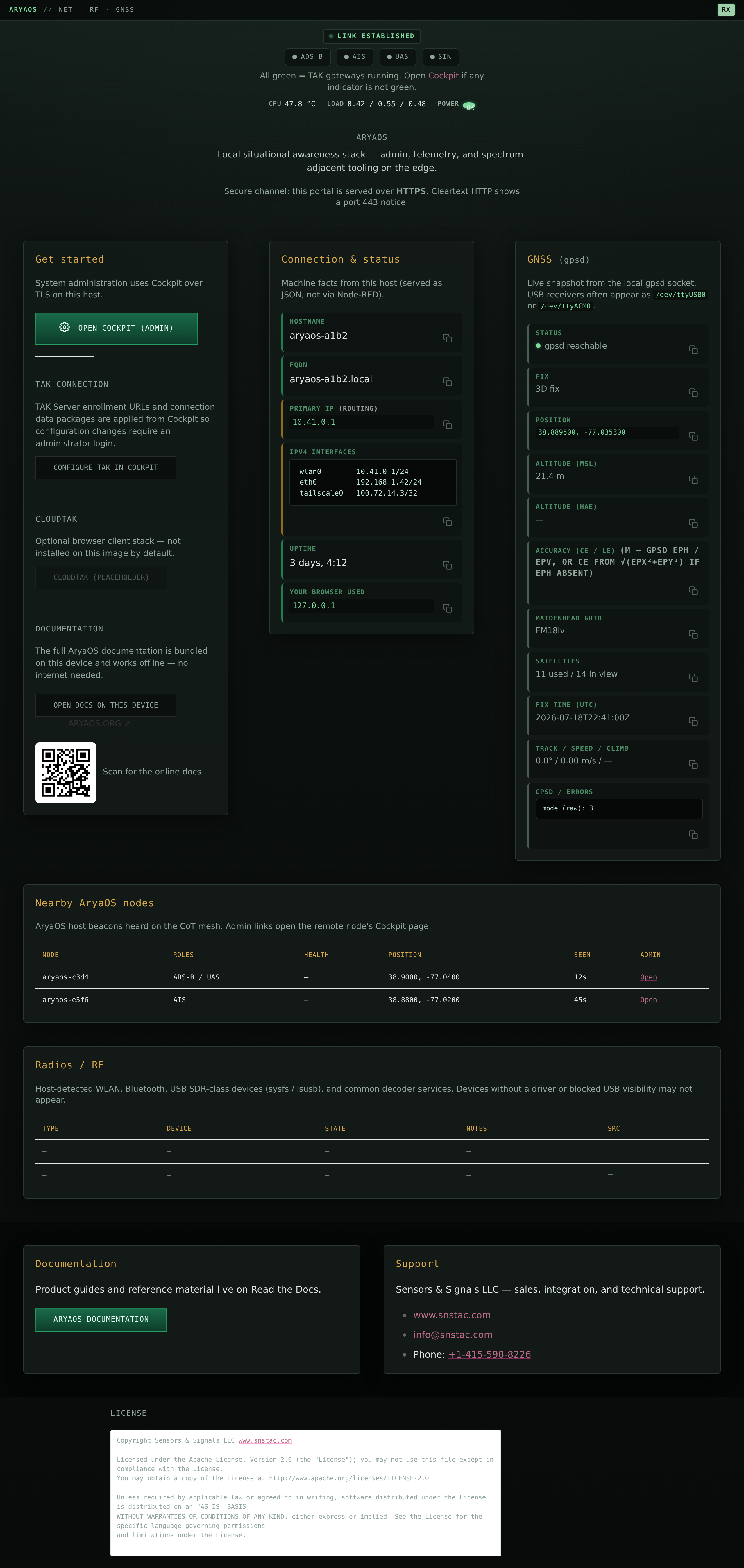
The portal polls a JSON status endpoint (/cgi-bin/aryaos-portal-status) every 8 seconds and shows:
- TAK gateway strip - live up/down/degraded state of
cotbridge,adsbcot,aiscot,lincot, the DroneCOT family, andsikw00fcot. - System health - CPU temperature, load average, memory, and Raspberry Pi power/throttle state.
- Connection & status - hostname, FQDN, primary IP, the full IPv4 address block, and uptime.
- GNSS - the gpsd position fix: latitude/longitude, MSL and HAE altitude, CE/LE accuracy, Maidenhead grid, and satellites in view/used.
- Radios / RF - an inventory of Wi-Fi, Bluetooth, and USB SDR hardware plus decoder service state.
The portal is read-only. All changes happen in Cockpit or, for Wi-Fi onboarding, Comitup. See HTTPS landing portal for the full status schema.
Map of the admin surfaces
Cockpit's left-hand menu lists standard system pages (Overview, Logs, Storage, Networking, Software Updates, Accounts, Services, Terminal) plus the AryaOS-specific plugins installed from the signed snstac package repository. The pages below are the ones you will use most:
-
AryaOS Site - The flagship page. TAK destination, site-wide TLS, TAK Server enrollment, device role, radios, updates, VPN, support bundles. More, all writing the shared site configuration. Open the reference
-
COTBridge lane editor - The CoT router. Define the ingress/egress lanes that carry Cursor on Target (CoT) from local feeders out to Mesh SA and TAK Servers. Edit lanes
-
Gateway pages - One Cockpit plugin per sensor gateway (adsbcot, aiscot, dronecot, lincot, gps, gpscot, aiscatcher). Per-service tuning, service controls, TLS, and logs. See the pattern
-
Node-RED dashboard - Maps, TFR injection, and optional recording. Deprecated for configuration. Node-RED
Where each thing is configured
If you are not sure which surface owns a setting, start with the configuration model. This explains the inheritance from the site config down to each /etc/default/<svc> file.
Getting here for the first time
If you have not yet flashed and booted a device, start with the Quickstart. To point the unit at a TAK Server, see Connect to a TAK Server.